…it’s really important for folks who are doing online or using the online space to think about visuals and think about visuals as related to accessibility. [And] acknowledging that in fact, the visual information is able to be received, retained and understood…So it’s something that we need to do if we’re going to be in online spaces…
– Participant 82
Many Community Leaders are concerned about making sure materials they use and meetings they hold are accessible to everyone in the community.
When designing meetings, gatherings or any type of community activity online it is really important to consider accessibility before beginning your planning.
Digital inclusion
Most of us are familiar with the need for physical accessibilities such as the need for ramps and elevators. The online space seems accessible but often there might be multiple barriers of participation that aren’t always visible.
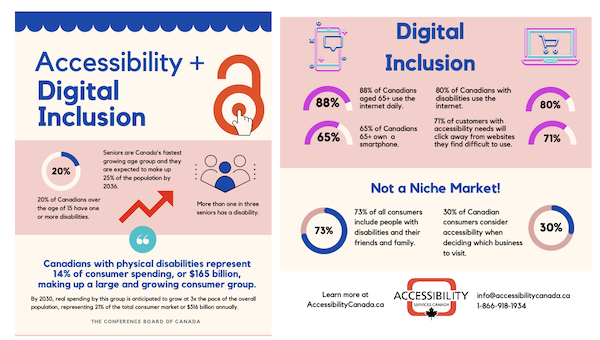
As community leaders, we can work to ensure accessibility when gathering. Accessibility Services Canada provides us with this infographic of why we should ensure digital inclusion.
People experience learning differently
People experience learning differently. Some people learn through reading, others through listening, some are visual learners and others through ‘feeling.’ There is no right or wrong way to learn and many of us use a combination of methods.
Universal Design in Learning (UDL) is a teaching method that recognizes that people learn and understand differently.
UDL is useful to community leaders when planning meetings or events, sharing knowledge with other or leading workshops for the community.
If we recognize that people learn differently and offer them options in the ways they can participate, we are more likely to build knowledge, action and community!
Applying UDL to community work
UDL suggests key ways of sharing information that can be applied to community work.
- Engagement: Offer multiple different ways for people to participate (engagement) and validate all options. Offer supports as required to ensure full understanding and engagement. This includes recognizing peoples’ diverse language capacities and their differing levels of comprehension to create an inclusive climate.
- Representation: Present information in different ways to support access and support. For example, visuals, print, music, art. Be creative in how you share information and move away from just printed English-only materials. Video format can be more accessible and, if posted on YouTube, comes with the possibility of a written transcript and translation options.
- Action and expression: Think of creative and varied ways for people to express themselves, some people are good at writing and presenting information, while others may do better drawing pictures to share information. Be flexible and open to ensure participation.
Universal Design in Learning at its core is a tool to address inequities that people may face due to structural barriers connected to a persons’ social identity.
As Community Leaders, we can commit to designing more equitable meetings, events and workshops that honour different and multiple ways of learning.
Accessibility tips for written documents and slide presentations
These two tip sheets from Accessibility Services Canada discuss ways to make documents more accessible including which fonts to use, what size text is appropriate and even colour combinations.
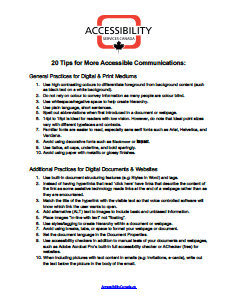

Accessibility Services Canada has a number of other helpful resources on how to make your documents more accessible. See the resources linked below.
Language considerations
Many community members encounter language barriers when trying to get involved in their community.
When designing meetings, we can consider using tools that can help more people understand and actively participate in meetings.
For example, in online meetings, making sure people speaking have their cameras on can make it easier to follow what is going on.
As well, most online tools, such as Zoom offer language translation during meetings. It is well worth investing in language features if it means more community members will attend and also feel part of the community.
More accessibility resources
Accessibility Services Canada
- Accessibility Services Canada also offers trainings and workshops to organizations or individuals. Learn more at AccessibilityCanada.ca
Accessibility for Ontarians Disability Act (AODA)
- To learn more about the law guiding accessibility (Accessibility for Ontarians Disability Act – AODA) check out the Ontario Human Rights Commission.
- The Ontario Human Rights Code is a law that protects us from discrimination and harassment in many areas. One area is perceived, past, or present disabilities. Get more information on what the Human Rights Code says about protecting people who have disabilities.
- The Human Rights Commission also offers a self-directed e-learning on AODA that is free to take. When you finish, you can receive a Certificate of Completion that you can add to your resume.
Social media accessibility
- Queen’s University has created this helpful guide on ensuring accessibility when using social media: Why make social media accessible?
Universal Design in Learning (UDL)
- The Government of Canada provides information on universal design for learning.
- CAST is the organization that first developed UDL. See the CAST guidelines.
- George Brown Polytechnic has a UDL Framework.