
Instructions for playing video captions
Click the play button in the middle of the video.
When the video begins to play, icons will appear in the upper right. If they are not there, run your cursor over the video to make the icons reappear.
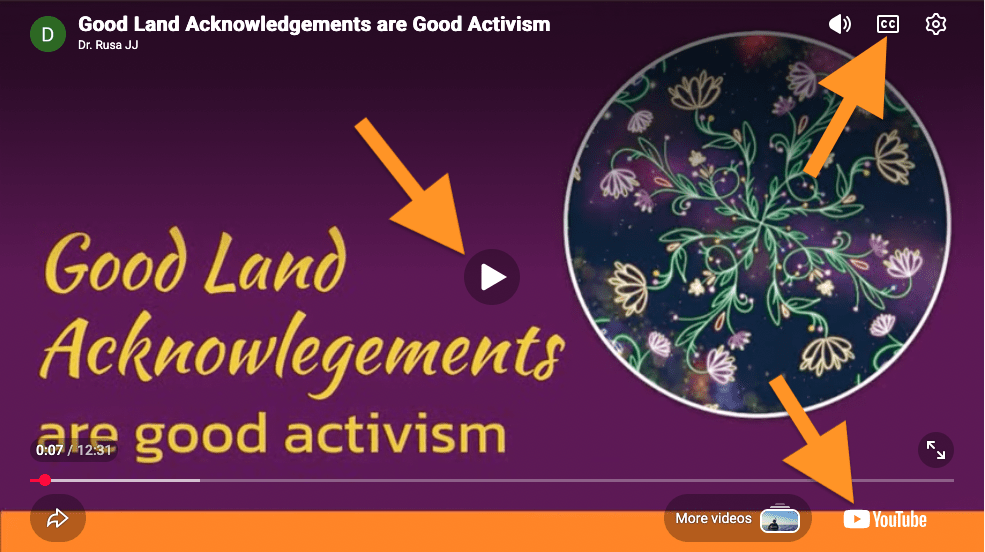
Click the CC icon in upper right to start the closed captions.
Click the YouTube logo in the lower right to get captions in other languages. Doing this will take you away from this website.
Instrucciones para activar los subtítulos del video
Haz clic en el botón de reproducción en el centro del video.
Cuando el video comience a reproducirse, aparecerán íconos en la esquina superior derecha. Si no aparecen, coloca el cursor sobre el video para que vuelvan a aparecer.
Haz clic en el ícono “CC” en la esquina superior derecha para activar los subtítulos.
Haz clic en el logo de “YouTube” en la esquina inferior derecha para ver los subtítulos en otros idiomas. Al hacerlo, saldrás de este sitio web.
视频字幕播放说明
点击视频中间的播放按钮。
视频开始播放后,右上角会出现图标。如果图标没有出现,请将鼠标悬停在视频上,图标就会重新出现。
点击右上角的“CC”图标即可开启隐藏式字幕。
点击右下角的“YouTube”图标即可查看其他语言的字幕。点击后,您将离开本网站。
تعليمات تشغيل ترجمة في الفيديو
انقر على زر التشغيل الموجود في منتصف الفيديو
عند بدء تشغيل الفيديو، ستظهر أيقونات في الزاوية العلوية اليمنى. إذا لم تظهر، حرّك المؤشرالماوس فوق الفيديو لتظهر الايقونات مرة أخرى
انقر فوق رمز
“CC”
في أعلى الزواية اليمنى لبدء الترجمة
انقر فوق شعار يوتيوب في أسفل الزواية اليمنى للحصول على الترجمة بلغات أخرى عند القيام بذلك سيتم نقلك خارج هذا الموقع
راهنمای فعالسازی زیرنویس ویدیو
روی دکمه پخش در وسط ویدیو کلیک کنید.
وقتی ویدیو شروع به پخش کرد، آیکونها در گوشه بالا سمت راست ظاهر میشوند. اگر دیده نشدند، نشانگر ماوس را روی ویدیو ببرید تا دوباره ظاهر شوند.
برای فعال سازی زیرنویس ها روی آیکون
“CC”
در گوشه بالا سمت راست کلیک کنید
برای دریافت زیرنویس به زبانهای دیگر روی لوگوی
“You Tube”
در گوشه پایین سمت راست کلیک کنید. با انجام این کار از این وبسایت خارج خواهید شد
வீடியோ வசனங்களை இயக்குவதற்கான வழிமுறைகள்
வீடியோவின் நடுவில் உள்ள இயக்குவதற்கான பட்டனைக் கிளிக் செய்யவும்.
காணொளி இயங்கத் தொடங்கும் போது, மேல் வலதுபுறத்தில் சின்னங்கள் தோன்றும். அவை தோன்றவில்லை என்றால், சின்னங்களை மீண்டும் தோன்றச் செய்ய உங்கள் சுட்டியைக் (icons) காணொளியின் மீது நகர்த்தவும்.
சப்டைட்டில்களைத் தொடங்க, மேல் வலதுபுறத்தில் உள்ள “CC” ஐகானைக் கிளிக் செய்யவும்.
பிற மொழிகளில் வசனங்களைப் பெற, கீழ் வலதுபுறத்தில் உள்ள “YouTube” சின்னத்தைச் கிளிக் செய்யவும். அவ்வாறு செய்வதால் நீங்கள் இந்த இணையதளத்திலிருந்து வெளியேறிவிடுவீர்கள்.